
Share this
Getting the most accuracy from your heart rate monitor
by Ben Hackney-Williams on Tuesday, 26 October 2021
Smart training starts with a solid foundation. We all need the right basic skills to get faster, stronger and more agile. It’s important to make sure your tech is set up for success, too. Before your use your MZ-Switch, follow these steps for the best results that will kickstart your new goals.
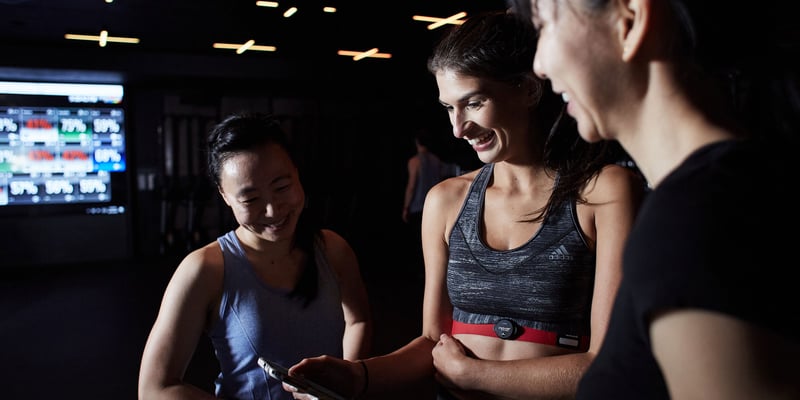
Wearing your heart rate monitor on your chest.
Tempting as it may be, don’t press the power button when you exercise with your Switch on your chest. If you do, as soon as the ECG sensors detect your heart rate, your belt will turn off with a beep. It should activate again a few seconds later, but to avoid confusion, avoid the button for chest-based sessions.
Also be sure your device is snapped in the right way around when looking at it straight-on. The Myzone logo should be readable. The belt traces the electrical pathway of your heartbeat, so it’s important that it faces the right direction to ensure an accurate and consistent reading.
Wetting the sensors on the back of your strap speeds up connectivity. We recommend doing this before strapping in each time.
Make sure your strap fits comfortably snug. While many wear the module in the center of their chest, others find they get better connection with it shifted to the left. See what works best for you.
Wearing your heart rate monitor on your wrist or arm.
Now it’s time to use the power button. Press and hold the pulse symbol (it looks like an M) on the module until you hear it beep once and the light flashes green.
Running, biking, hiking and other rhythmic, non-gripping movements are best for the arm and wrist straps.
Want to track your heart rate swimming some laps or riding the surf? The wrist strap is the only one that should be used in the water.
For the best increased accuracy using the PPG sensor, we recommend placing the module on the outside of your arm.
Be sure that in either location, you have your Switch strapped in so that you cannot see the LEDs flashing against your skin, but not too tight, as that can constrict blood flow.
Updating your heart rate monitor.
We’re constantly updating the tech to ensure accuracy, so do be sure you run firmware updates when they are available. You will receive a notification in the app when your belt is connected to the workout screen. They should only take a moment to run, but if you need to get moving right away, you can dismiss it and run once you are done. To update your heart rate monitor’s firmware when it suits you, open the app and go to settings > utility > update firmware.
For more helpful articles, or to get in touch with our team visit here.
Share this
- Myzone (159)
- Users (112)
- Community (109)
- trainers (94)
- master-trainers (87)
- News (85)
- Ayla Donlin (84)
- Emily Sopo (71)
- Myzone partners (56)
- fitness (40)
- clubs (38)
- Health and wellbeing (33)
- Myzone insight (28)
- Support (11)
- trainer (11)
- Guest Blog (7)
- guest-authors (7)
- myzone-press-releases (7)
- AFS (6)
- Challenges (6)
- member engagement (5)
- Club stories (4)
- Groups (4)
- Gamification (3)
- Media (3)
- Product Help (3)
- gym owners (3)
- MZ-Switch (2)
- Motivation (2)
- Physical health (2)
- Updates (2)
- fitness marketing (2)
- Corporate wellness (1)
- ECG (1)
- Heart Rate Training (1)
- Mental health (1)
- Myzone fitness tracker (1)
- PPG (1)
- Uncategorized (1)
- Wellness (1)
- member retention (1)
- wearable technology (1)
- March 2026 (1)
- February 2026 (2)
- January 2026 (2)
- December 2025 (1)
- November 2025 (1)
- October 2025 (3)
- September 2025 (3)
- August 2025 (1)
- July 2025 (4)
- June 2025 (2)
- May 2025 (1)
- April 2025 (3)
- March 2025 (3)
- February 2025 (4)
- January 2025 (4)
- December 2024 (2)
- November 2024 (4)
- October 2024 (5)
- September 2024 (7)
- August 2024 (2)
- July 2024 (2)
- June 2024 (5)
- May 2024 (1)
- April 2024 (6)
- March 2024 (4)
- January 2024 (4)
- December 2023 (3)
- November 2023 (3)
- October 2023 (8)
- September 2023 (6)
- August 2023 (8)
- July 2023 (10)
- June 2023 (5)
- May 2023 (12)
- April 2023 (2)
- March 2023 (5)
- February 2023 (12)
- January 2023 (12)
- December 2022 (2)
- November 2022 (7)
- October 2022 (5)
- September 2022 (7)
- August 2022 (2)
- July 2022 (2)
- June 2022 (9)
- May 2022 (7)
- April 2022 (4)
- March 2022 (9)
- February 2022 (3)
- January 2022 (8)
- December 2021 (1)
- November 2021 (6)
- October 2021 (6)
- September 2021 (9)
- August 2021 (9)
- July 2021 (3)
- June 2021 (5)
- May 2021 (4)
- April 2021 (3)
- March 2021 (1)
- February 2021 (2)
- January 2021 (2)
- December 2020 (2)
- November 2020 (2)
- September 2020 (1)
- August 2020 (2)
- July 2020 (5)
- June 2020 (2)
- May 2020 (4)
- April 2020 (2)
- January 2020 (1)
- December 2019 (1)
- October 2019 (1)
- July 2019 (1)
- June 2019 (1)
- May 2019 (2)
- April 2019 (3)
- March 2019 (1)
- February 2019 (1)
- December 2018 (1)
- November 2018 (1)
- October 2018 (2)
- May 2018 (1)
- April 2018 (1)
- March 2018 (5)
- February 2018 (6)
- January 2018 (7)
- December 2017 (4)
- November 2017 (5)
- October 2017 (4)
- September 2017 (5)
- August 2017 (6)
- July 2017 (4)
- June 2017 (3)
- May 2017 (5)
- April 2017 (5)
- March 2017 (3)
- February 2017 (5)
- January 2017 (17)
- December 2016 (10)
- November 2016 (7)
- October 2016 (6)
- September 2016 (12)
- August 2016 (9)
- July 2016 (6)
- June 2016 (7)
- May 2016 (7)
- April 2016 (9)
- March 2016 (7)
- February 2016 (7)
- January 2016 (8)
- December 2015 (2)
- November 2015 (4)
- October 2015 (5)
- September 2015 (5)
- June 2015 (6)
- May 2015 (3)