
Share this
by Myzone on Thursday, 5 January 2017
If you are a fitness professional and use MYZONE at your facility, the “Class Creator” function of MYZONE.org is a must-use for a group fitness heart rate tracker!
This feature allows you to develop and save an entire class down to the second, based on the MYZONE zones. Then, the saved class will play to provide a visual for you and your class as you teach, so members know exactly which zone they should be in. The Zone Match feature is a group fitness heart rate tracker that will give members a score at the end of the class which indicates the percentage of time their zone matched the zone you programmed for the class. Talk about accountability!
In our experience using MYZONE in our group fitness and small group training, we’ve found one practice that you must use to create an effective class that your members will love…programming transitions.
While it may seem obvious, we’ve found that it is very easy for instructors to forget to account for the time it takes to transition between different heart rate zones. This is important from both a programming perspective and a coaching/cueing perspective. Read on to learn our tips for including transitions and for adjusting the timing of your intervals to account for transitions.
Here we go!
We know that as we adjust the intensity during an exercise session, our heart rate will gradually move through the MYZONE zones (GRAY, BLUE, GREEN, YELLOW, & RED). For example, if you’re running sprints, you might start in the BLUE zone and then quickly progress through the GREEN, YELLOW, and even RED zone. The same thing will happen when you slow down or stop running – your heart rate will hit each zone as it recovers.
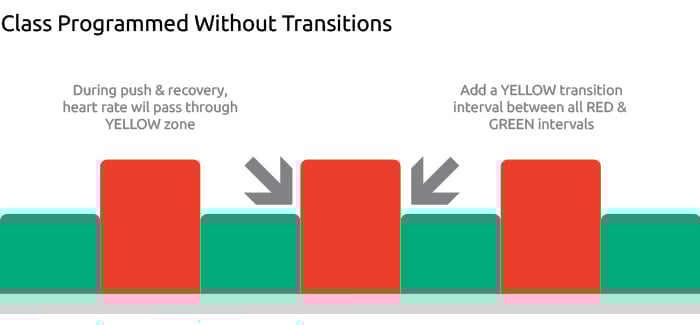
Knowing this, it is critical that we plan for these transition periods within our classes. Imagine the same scenario above – you’re coaching your clients through sprints and instruct them to push into the RED zone and then recover to the GREEN zone. If your sprints are programmed so that the client is instructed to go from the GREEN zone immediately back into the RED zone, you’ll likely set the client up for failure because you haven’t accounted for the transition time when the client will be in the YELLOW zone.
Check out two sections of programmed classes below.
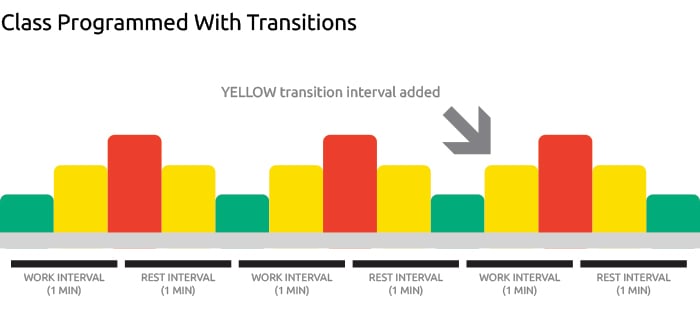
Now that we see how we should program for transitions, let’s talk about how this will impact the timing of intervals you program for your class. Let’s say you’re cueing a 1-minute work phase/push aiming for the RED zone followed by a 1-minute recovery aiming for the GREEN zone, as we have done in the class above (“Class Programmed with Transitions”). Does this mean you’re going to cue members to push in the RED for 1 minute and recover in the GREEN for 1 minute? Nope. In order for the zones you’re programming to match your clients’ heart rate responses, you will need to adjust the timing of your intervals to allow your members’ heart rates to gradually move through GREEN, YELLOW, and RED.
In the example above, we’ve programmed the following:
- 30 seconds in the GREEN zone
- 30 seconds in the YELLOW zone
- 30 seconds in the RED zone
- 30 seconds in the YELLOW zone
- Repeat this sequence
We’re still going to coach our clients to push for 1 minute and recover for 1 minute. However, we’d start the “push” while we’re still in GREEN, likely 10-15 seconds before the client is supposed to hit YELLOW. The client will push through the YELLOW zone and up into the RED zone. While they’re in the RED zone, we would cue them to recover, knowing that their heart rate might stay in the RED zone for several seconds before making its way into the YELLOW and GREEN zones.
Here’s a key rule to remember: start your work and recovery phases before you’re supposed to hit a new zone. This will ensure that there is enough time for your heart rate to increase or decrease into the suggested zone.
Of course, how you time the cueing of your intervals will depend on which zones you’re targeting and the duration of the work and rest intervals. Keep in mind that in general, your classes will be able to sustain lower- and moderate-intensity zones for longer than higher-intensity zones, so be sure to program accordingly.
We encourage you to play with the Class Creator function and observe how closely your members are able to match the zones you’ve programmed. While you’re getting used to creating classes with MYZONE, take some time after class to ask your members for feedback. Did they feel that the zones you programmed were challenging but attainable? Did they think you gave them enough time to transition through the different zones? In our experience, members are happy to offer feedback and eager to have a say in how you design future classes.
We hope you find these tips useful as you are creating your classes with MYZONE as a group fitness heart rate tracker! Be sure to share photos and videos of your classes on social media using the hashtags #myzonemoves and #effortrewarded so we can see how you’re doing!
For more tips on how to use MYZONE in your training, follow us during Fitness Fridays on Facebook Live (subscribe on MYZONE’s Facebook Page) – 8 am PT, 11 am ET.
Keep moving forward!