
Share this
Troubleshooting your MZ-Switch
by Vita Di Pasca on Tuesday, 26 October 2021
Having troubles with your MZ-Switch? Check out these helpful tips to get you back up and running in no time.
Before you begin:
Wrist/Arm:
-
Strap your MZ-Switch to your wrist or arm, then press the pulse button until you hear a beep and see the light flash green.
Chest:
- Strap your MZ-Switch to your chest and allow at least 30 seconds for your MZ-Switch to detect your heart rate—the chest strap reads a few cycles of your heart rate before activating to ensure accuracy.
The power button does not work when used on the chest; Please do not press the button to activate when using it here. It automatically activates when the EKG pads on your strap pick up your heart rate.- Always thoroughly dampen the strap sensors to speed up connection
1. Choose the strap best strap for your workout:
- Wear the wristband for swimming and non-gripping activities with repetitive movements.
- Wear the armband for a more accurate reading of non-gripping activities and repetitive movements. Don’t use the armband for swimming.
-
Wear the chest strap for the most accurate reading for all types of exercises, but not swimming.
Check out our guide for the best way to wear your MZ-Switch for everything from dancing and diving to horseback riding and hockey.
MZ-Switch Recommended Activities Table.
2. Snug is best
- Make sure the strap is comfortably snug on your wrist, arm, or chest.
- On your wrist or arm, you should not be able to see the green LED's against your skin, but it should not be so tight that it restricts blood flow.
- On your chest, it should be tight enough that it does not shift with movement, but not to the point of discomfort.
3. Check your battery level
Check your battery at any time on the workout screen on the app. No need to have your belt activated—the app remembers the charge level from the last time it saw your belt.
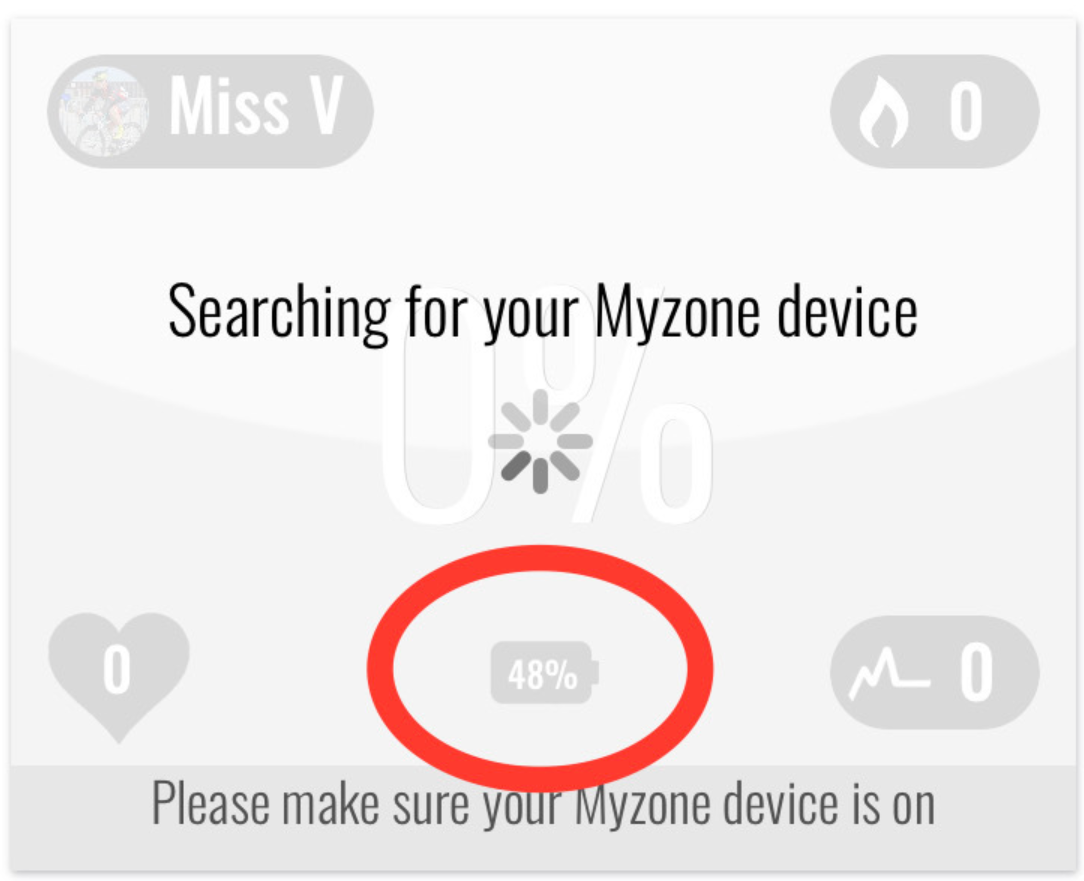
If you wear your Switch on your wrist and see it flash orange when you press it on or off, this means you are at 30% battery life. Snap it into its charging cable and plug in to a computer USB or 5v charging block to get fully charged up for next time and avoid data loss.
4. Keep your chest strap clean
Salt build-up can impede the connection and also cause chafing--make sure you wipe it down thoroughly. The strap can be machine-washed in cold water, but don't put it in the dryer.
Clean around the snaps with an a damp cloth to clear away any salt or soap residue. Do not use anything alcohol-based as that can damage them module.
5. Still Having Problems?
Myzone Technical Support can help with warranty replacements. From the main screen on the app, tap Help to submit a ticket or to speak to someone.
Share this
- Myzone (159)
- Users (112)
- Community (109)
- trainers (94)
- master-trainers (87)
- News (85)
- Ayla Donlin (84)
- Emily Sopo (71)
- Myzone partners (56)
- fitness (40)
- clubs (38)
- Health and wellbeing (33)
- Myzone insight (28)
- Support (11)
- trainer (11)
- Guest Blog (7)
- guest-authors (7)
- myzone-press-releases (7)
- AFS (6)
- Challenges (6)
- member engagement (5)
- Club stories (4)
- Groups (4)
- Gamification (3)
- Media (3)
- Product Help (3)
- gym owners (3)
- MZ-Switch (2)
- Motivation (2)
- Physical health (2)
- Updates (2)
- fitness marketing (2)
- Corporate wellness (1)
- ECG (1)
- Heart Rate Training (1)
- Mental health (1)
- Myzone fitness tracker (1)
- PPG (1)
- Uncategorized (1)
- Wellness (1)
- member retention (1)
- wearable technology (1)
- March 2026 (1)
- February 2026 (2)
- January 2026 (2)
- December 2025 (1)
- November 2025 (1)
- October 2025 (3)
- September 2025 (3)
- August 2025 (1)
- July 2025 (4)
- June 2025 (2)
- May 2025 (1)
- April 2025 (3)
- March 2025 (3)
- February 2025 (4)
- January 2025 (4)
- December 2024 (2)
- November 2024 (4)
- October 2024 (5)
- September 2024 (7)
- August 2024 (2)
- July 2024 (2)
- June 2024 (5)
- May 2024 (1)
- April 2024 (6)
- March 2024 (4)
- January 2024 (4)
- December 2023 (3)
- November 2023 (3)
- October 2023 (8)
- September 2023 (6)
- August 2023 (8)
- July 2023 (10)
- June 2023 (5)
- May 2023 (12)
- April 2023 (2)
- March 2023 (5)
- February 2023 (12)
- January 2023 (12)
- December 2022 (2)
- November 2022 (7)
- October 2022 (5)
- September 2022 (7)
- August 2022 (2)
- July 2022 (2)
- June 2022 (9)
- May 2022 (7)
- April 2022 (4)
- March 2022 (9)
- February 2022 (3)
- January 2022 (8)
- December 2021 (1)
- November 2021 (6)
- October 2021 (6)
- September 2021 (9)
- August 2021 (9)
- July 2021 (3)
- June 2021 (5)
- May 2021 (4)
- April 2021 (3)
- March 2021 (1)
- February 2021 (2)
- January 2021 (2)
- December 2020 (2)
- November 2020 (2)
- September 2020 (1)
- August 2020 (2)
- July 2020 (5)
- June 2020 (2)
- May 2020 (4)
- April 2020 (2)
- January 2020 (1)
- December 2019 (1)
- October 2019 (1)
- July 2019 (1)
- June 2019 (1)
- May 2019 (2)
- April 2019 (3)
- March 2019 (1)
- February 2019 (1)
- December 2018 (1)
- November 2018 (1)
- October 2018 (2)
- May 2018 (1)
- April 2018 (1)
- March 2018 (5)
- February 2018 (6)
- January 2018 (7)
- December 2017 (4)
- November 2017 (5)
- October 2017 (4)
- September 2017 (5)
- August 2017 (6)
- July 2017 (4)
- June 2017 (3)
- May 2017 (5)
- April 2017 (5)
- March 2017 (3)
- February 2017 (5)
- January 2017 (17)
- December 2016 (10)
- November 2016 (7)
- October 2016 (6)
- September 2016 (12)
- August 2016 (9)
- July 2016 (6)
- June 2016 (7)
- May 2016 (7)
- April 2016 (9)
- March 2016 (7)
- February 2016 (7)
- January 2016 (8)
- December 2015 (2)
- November 2015 (4)
- October 2015 (5)
- September 2015 (5)
- June 2015 (6)
- May 2015 (3)