
Share this
by Myzone on Tuesday, 1 November 2022
The Myzone users are a unique community; they engage, ask smart questions, and strive to improve their fitness and understanding of heart rate training! This blog is inspired by them and their core questions.
This blog reviews a key concept of heart rate training using MYZONE – estimated maximal heart rate (MHR). Understanding estimated MHR will not only help you with using your using, teaching, or training with your Myzone belt but with improving your fitness too. Let’s jump right in.
Introducing Estimated Maximal Heart Rate
Your estimated MHR is a very important piece of heart rate training because it dictates your relative exercise intensity or percentage of estimated MHR. Myzone breaks percentage of estimated MHR into beautiful color-coded zones.
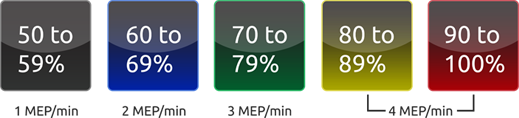
We train in each zone for different reasons and to achieve different goals. Therefore, if your estimated MHR is incorrect, your training in the zones may not produce the results you’re looking for.
Fear not – Myzone uses an algorithm to estimate your MHR that is accurate for most people. However, it is worth it for all of us to ensure that our estimated MHR is correct.
Calculate you MHR
We can determine if our estimated MHR is correct by comparing our Myzone zones to our rate of perceived exertion (RPE) during cardiorespiratory exercise. That last part – “during cardiorespiratory exercise” – is important, because RPE doesn’t always match up with exercise intensity during muscular fitness or resistance training.
The rate of perceived exertion uses a scale of 1 - 10 (1 = lightest intensity, 10 = maximal intensity). The Myzone zones align with RPE during cardiorespiratory exercise. For example, you should feel like you’re at about a 6 on the RPE scale when you’re exercising in the Blue zone (60 - 69% of estimated MHR), and you should feel like you’re at about a 9 or 10 on the RPE scale when you’re in the RED zone (90%+ of estimated MHR).
If you’re a new MYZONE user, pay attention to your colour zones and your RPE during your first few cardiorespiratory workouts. Do they align closely? Is there an obvious discrepancy?
If they are closely aligned, your estimated MHR is likely accurate for you. The zones should match the RPE score exactly or be within 1 RPE score. For example, if you’re in the BLUE zone at 62% of your MHR, an RPE score of 5 or 6 would be appropriate. If you’re in the BLUE zone at 68% of your MHR, an RPE score of 6 or 7 would be appropriate.
We also recommend that you perform a submaximal exercise assessment to assess the similarity. Trainers – this is a great one to do with your clients! You can find all of the steps here.
What is my Maximum Heart Rate is incorrect?
If there's a discrepancy showing between your zones and RPE, you can adjust your mHR as below.
- Your RPE is high but you're in a low-to-moderate intensity zone.
Your estimated MHR may be too high and must be adjusted down. - Your RPE is high but you're in a low-to-moderate intensity zone.
Your estimated MHR may be too high and must be adjusted down.
What Are Some Telltale Signs That My Estimated MHR May Be Incorrect?
There are several obvious signs that your estimated MHR may need an adjustment. If you are a trainer or instructor and see one of these signs, we encourage you to approach your client or class member. It might be time to have a conversation with them about their estimated MHR.
- Your RPE and MYZONE zones do not match during several cardiorespiratory workouts.
- You are in the GRAY and BLUE zones even though you are putting in a lot of effort.
- You are in the RED zone for several minutes at a time and feel that you could continue exercising without needing to stop.
- Remember, the RED zone should feel incredibly challenging and should not be something you can maintain for more than a couple minutes at a time. The exception to this is highly trained individuals who have a very high anaerobic threshold. You can learn more about the RED zone here and here.
- You keep hitting 100% of your estimated MHR without putting in maximal effort.
- If you reach 100% of your estimated MHR and hold it for at least 10 seconds, MYZONE will automatically adjust your estimated MHR to the heart rate you were able to hold above 100%. In this case, you will receive an email from MYZONE notifying you of this adjustment. If the adjustment was made in error, please contact MYZONE support.
How do I adjust my Maximum Heart rate?
Contact Myzone support via the Myzone app or your online dashboard. Click on “Settings,” then “Support” in the app and you will be able to contact support via live chat.
In your message, explain the discrepancy you're seeing and ask them to adjust your estimated MHR accordingly.
Let us know how your workouts are going by tagging us @myzonemoves
Keep Moving Forward!