
Share this
by Ben Hackney-Williams on Friday, 21 May 2021
Sometimes it’s hard to leave behind a trusty tech relationship for a new wearable that really gets your heart racing. We’ve listened to your feedback about the MZ-Switch heart rate monitor and put together this handy guide to make the transition as smooth as possible.
Below you’ll find 10 of the most frequently asked questions from the Myzone squad, answered to help you switch things up and keep earning MEPs with the world’s first interchangeable heart rate monitor for the gym, outdoors or in water.
Why won’t my MZ-Switch heart rate monitor turn on?
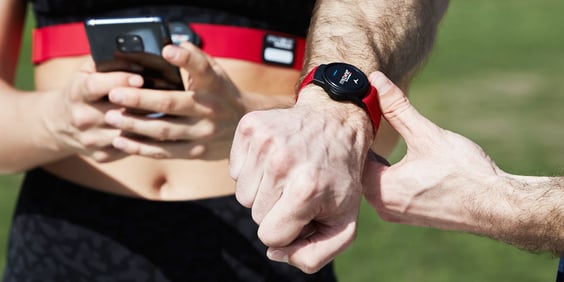
On your chest, the MZ-Switch measures your heart rate with an electrocardiogram sensor (ECG). It will turn on and notify you with a beep automatically. If it doesn’t, moisten the black pads on the strap.
If you’re using the Switch on your arm or wrist, your heart rate is measured with the photoplethysmogram sensor (PPG), also known as an optical blood flow sensor. It’s important to remember that the symbol on the Switch module is a power button for this; you need to press and hold that until you see the green light flash and hear a single beep.
Why are the results different on my wrist?
We always say that, for the most accurate heart rate measurements, use the chest strap for ECG readings. The wrist and arm results are measured via PPG technology, rather than ECG. PPG estimates your heart rate based on your pulse, while ECG traces the electrical pathway of your heart. PPG is approximately 95% accurate, whereas ECG is over 99% accurate.
Will I lose my Myzone status and MEPs if I upgrade to the MZ-Switch?
No, your Myzone status is safe. When you get your new Switch heart rate monitor, simply change your belt ID on the app under Settings > My Profile. You’ll find your new Switch ID serial number on the back of the device (“SN: xxxxxxx” – you only need to input the numbers on the app). If you're already familiar with Myzone then the MEPs and the zones all work in the same way, so you’re all set!
Do I need to charge my new heart rate monitor straight out of the box?
You should have battery charge in your new device, but we recommend charging your Switch up to 100% before you begin as the battery can drain a little between the factory and first use.
To charge your MZ-Switch, simply attach your module to the charging cable included in the box and plug it in to any USB charger in any power adaptor that is 5 volts or less, alternatively plug into your computer or laptop. Don't use a 9 volt power adaptor to charge Myzone wearables because it may overheat the module.
Why can’t I lift weights or do HIIT with the MZ-Switch on my wrist?
Less predictable movements and the tension from gripping make it more difficult for the heart rate monitor’s PPG sensor to predict your heart rate based on blood flow.
Try your device out with a number of movements and workouts to see what’s best for you, but our advice on when to wear the Switch is:
Wrist – Use for non-gripping activity and repeatable movements, including swimming.
Arm – Use for improved accuracy during non-gripping activities and repeatable movements, except swimming.
Chest – Use for the most accurate readings during all types of exercises except swimming.
My heart rate monitor chest strap is slow to activate – what's going on?
To reduce the occurrence of accidental activations, the Switch requires five heart rate samples to activate, which means it will be slightly slower to go live on your app. We recommend always moistening the contact pads on the back of the strap to enhance conductivity, too.
How come I can’t connect to some cardio equipment in the gym?
The MZ-Switch was designed without an analog chip in so that you can benefit from features such as 36 hours of internal memory, dual-Bluetooth, and a smaller module size. Analog was also removed to eliminate "cross talk".
For example, if you’re wearing your belt and walk by someone who was on a machine, your belt might be picked up during their workout. More and more machines are being created without analog in favor of Bluetooth and ANT+ for this reason.
Will the Switch connect to my Garmin, Apple Watch or other third-party devices?
Yes, in fact because of the dual-channel Bluetooth, you can now sync up to both your Myzone app and your watch, Peloton, or other Bluetooth device with no problems.
Will my Switch heart rate monitor shut off automatically if I forget?
No – don’t forget! Make sure to listen for the three beeps to signal your module has turned off after your workout. If your battery does run out, it’s a quick charge before you’re back in the game with three to six months of battery life again. In addition, the Switch can store up to 30 hours of exercise data.
Can I Switch between wrist and chest heart rate sensors without separating the workout?
Yes, you can transition between the different locations and your workout will remain one cohesive graph. A 10-minute break in activity is required to separate activities.
For more information visit the Switch homepage. If you haven't already, buy a heart rate monitor and get moving with the Myzone community.